Last updated October 21, 2026
Emailgistics vs Intercom
Outlook-native email workflows without a customer messaging platform.
Get a Demo


Trusted by global teams across banking, healthcare, logistics, and beyond

















Intercom centers on messaging. Emailgistics focuses on email.
Intercom routes communication through chat and messaging channels. Emailgistics keeps shared mailbox workflows inside Outlook and adds auto-assignment, SLAs, analytics, reporting, and AI-enhanced replies, without the overhead of a customer messaging platform.

Work in Outlook, not a messaging hub
Shared inbox workflows vs customer messaging platforms
| Feature |  | Intercom |
|---|---|---|
| Microsoft 365 native | Yes | No |
| Where the team works | Inside Outlook | Messaging inbox |
| Automated assignment | Built-in | Limited |
| SLA tracking | Email-based SLAs | Conversation-based |
| AI-assisted replies | Email-based | Chat-focused |
| Analytics | Mailbox- and user-level | Conversation-level |
| Reporting | Inbox reporting | Messaging-centric |
| Fast adoption | Minutes | Must learn new platform |
What changes when email moves into Intercom
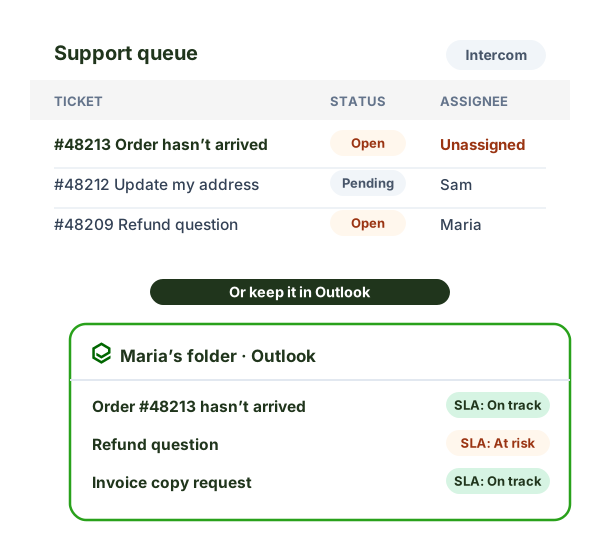
In Intercom, each email sent to your shared address becomes a conversation, and your team works in Intercom’s inbox. With Emailgistics, the email stays in your Microsoft 365 shared mailbox and your team works in Outlook.
- Where agents work: Intercom’s inbox vs. Outlook, the inbox they already know.
- Your shared mailbox: email is brought into Intercom vs. staying in Exchange Online.
- Ownership: Emailgistics routes every email to exactly one owner, so two people can’t reply to the same message.
- Rollout: a new system to set up and learn vs. live in under an hour.
For the bigger picture, see shared mailbox vs help desk tools.
Why teams choose Emailgistics over Intercom
- Outlook remains the primary workspace
- No customer messaging platform required
- AI-enhanced replies improve email response speed
- Reporting focused on inbox performance
- Lower cost than messaging-first platforms
- Fully aligned with Microsoft 365 governance and security
Intercom focuses on messaging, chat, and customer conversations within its own platform. Emailgistics manages shared inbox email directly in Outlook with assignment, SLAs, analytics, reporting, and AI-enhanced replies. Teams that rely on email rather than chat often prefer Emailgistics.
Emailgistics is a better fit when email is the primary communication channel and teams want to stay in Outlook. Intercom works best for real-time messaging and in-app support, while Emailgistics supports inbox-driven workflows.
Emailgistics applies ownership and SLAs directly to emails in shared mailboxes. Intercom tracks conversations inside its platform, which may not reflect how email-based teams operate. For inbox accountability, Emailgistics offers clearer visibility.
Teams in operations, internal services, and departments managing shared inboxes often prefer Emailgistics when chat-based tools are not a primary requirement.
Compare Emailgistics vs
Keep customer email inbox-first
Improve response times and accountability without adopting a messaging platform.