Last updated October 21, 2026
Emailgistics vs DragApp
Outlook-native automation without turning email into task boards.
Get a Demo

Trusted by global teams across banking, healthcare, logistics, and beyond

















DragApp reshapes email into boards. Emailgistics keeps email as email.
DragApp converts Gmail into a Kanban-style task system. Emailgistics keeps shared mailbox workflows inside Outlook, adding auto-assignment, SLAs, analytics, reporting, and AI-enhanced replies to provide structure to email without project boards or paying for extra tooling.

Work in Outlook, not a visual task board
Email-first workflows vs task-based inboxes
| Feature |  | DragApp |
|---|---|---|
| Microsoft 365 native | Yes | No |
| Outlook support | Yes | Gmail only |
| Automated assignment | Built-in | Task-based |
| SLA tracking | Yes | No |
| AI-assisted replies | Yes | No |
| Analytics | Mailbox- and user-level | Task-level |
| Reporting | Outlook-based | Limited |
| Fast adoption | Minutes | Requires board setup |
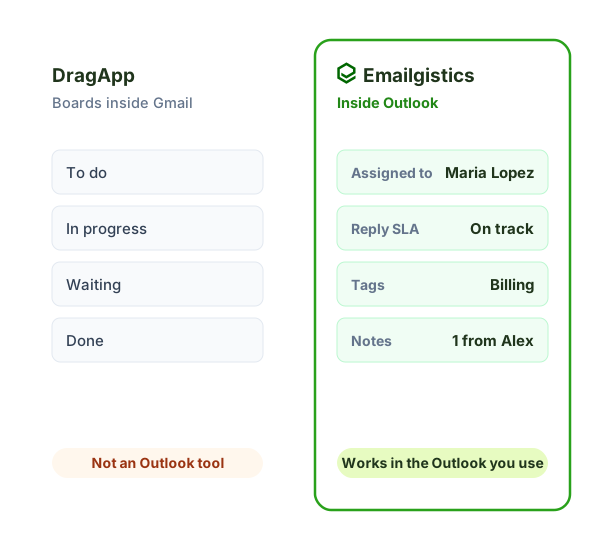
Boards in Gmail vs. email in Outlook
DragApp turns Gmail into Kanban-style boards. Emailgistics keeps email as email, inside Outlook, and adds ownership, SLA alerts and reporting to Microsoft 365 shared mailboxes.
- Platform: Gmail vs. Microsoft 365 and Outlook.
- How work is shown: cards on a board vs. email with a clear owner and status.
- Accountability: SLA targets with at-risk and breach alerts, plus reporting on reply times and workload.
Why teams choose Emailgistics over DragApp
- Built specifically for Microsoft 365
- No need to manage email as tasks on a board
- AI-enhanced replies improve turnaround time
- Reporting focused on inbox performance
- Scales across Outlook-based teams
- Built-in SLA tracking across all shared mailboxes
DragApp organizes email into task-style boards inside Outlook. Emailgistics keeps email in its native inbox view and adds assignment, SLAs, analytics, reporting, and AI-enhanced replies without requiring teams to manage boards. Teams focused on email workflows often prefer Emailgistics’ inbox-first model.
Emailgistics is a better fit when teams want accountability and performance tracking without adopting task boards. DragApp works best for teams that prefer visual task management, while Emailgistics supports teams that manage work primarily through shared mailboxes.
Emailgistics assigns clear ownership to emails and tracks response performance through SLAs and reporting. DragApp relies on board movement and task status, which can be less effective for tracking email response behavior. Teams that need inbox-level accountability often prefer Emailgistics.
Emailgistics scales across multiple shared mailboxes with centralized analytics inside Microsoft 365. DragApp requires board setup and ongoing management per inbox. For larger teams, Emailgistics typically offers lower operational overhead.
Compare Emailgistics vs
Keep email as email, not a task system
Add accountability to Outlook shared inboxes without reshaping email into projects.