Last updated October 21, 2026
Emailgistics vs HubSpot
Email management for Outlook teams, without adding a CRM platform.
Get a Demo


Trusted by global teams across banking, healthcare, logistics, and beyond

















HubSpot is a CRM with a help desk. Emailgistics is purpose-built for Outlook.
HubSpot embeds email workflows inside a broader CRM and support platform. For teams working in Outlook, Emailgistics adds assignment, SLAs, analytics, reporting, and AI-enhanced replies to shared mailboxes, without the cost of adopting a CRM for email management.

Built for Outlook vs built for CRM
Stay in your inbox vs moving workflows into a CRM portal
| Feature |  | HubSpot |
|---|---|---|
| Microsoft 365 native | Yes | No |
| Automated assignment | Yes | Inside CRM only |
| SLA tracking | Outlook-native | CRM-only |
| AI-enhanced speed | AI-accelerated replies | AI tied to HubSpot UI |
| Analytics | Shared mailbox analytics | CRM/ticket metrics |
| Reporting | Outlook-based reporting | CRM-centric reporting |
| Ideal for | Outlook teams | CRM-based support teams |
| Onboarding time | Minutes | Days or weeks |
What changes when email moves into HubSpot
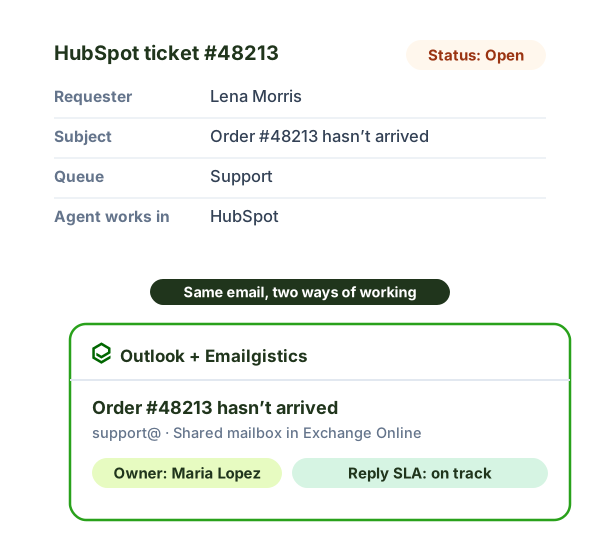
In HubSpot, each email sent to your shared address becomes a ticket or conversation, and your team works in HubSpot’s help desk. With Emailgistics, the email stays in your Microsoft 365 shared mailbox and your team works in Outlook.
- Where agents work: HubSpot’s help desk vs. Outlook, the inbox they already know.
- Your shared mailbox: email is brought into HubSpot vs. staying in Exchange Online.
- Ownership: Emailgistics routes every email to exactly one owner, so two people can’t reply to the same message.
- Rollout: a new system to set up and learn vs. live in under an hour.
For the bigger picture, see shared mailbox vs help desk tools.
Why teams choose Emailgistics over HubSpot
- No need to adopt a CRM for shared inbox workflows
- Ownership and SLAs applied directly to email, not tickets or records
- Inbox-level reporting focused on response performance, not CRM activity
- Keeps all email within your secure Microsoft 365 tenant
- Faster onboarding with minimal workflow disruption
- No CRM or marketing pipeline overhead for email teams
HubSpot Service Hub embeds email workflows inside a broader CRM designed around contacts, deals, and tickets. Emailgistics is purpose-built for Microsoft 365 shared mailboxes and works directly in Outlook. Teams that primarily manage work through shared inboxes often prefer Emailgistics’ inbox-first approach.
Emailgistics is a better fit when teams want assignment, SLAs, and reporting for shared inboxes without adopting a CRM. HubSpot works well for organizations already centered on CRM-driven workflows. Outlook-first teams that do not need full CRM functionality often choose Emailgistics for its simplicity and focus.
Emailgistics applies ownership and SLAs directly to emails within shared mailboxes, making responsibility clear at the inbox level. HubSpot manages ownership through tickets and CRM objects, which can add overhead for email-based teams. Emailgistics provides accountability without routing email through a CRM layer.
Emailgistics reporting focuses on response times, workload, and SLA performance across shared inboxes. HubSpot reporting is centered on CRM and ticket metrics tied to customer records. Teams focused on inbox responsiveness rather than CRM activity often find Emailgistics reporting more relevant.
Compare Emailgistics vs
Your Outlook shared mailboxes deserve better
See how Emailgistics elevates team performance.