Last updated October 21, 2026
Emailgistics vs Missive
Outlook-native automation for teams managing shared mailboxes in M365.
Get a Demo


Trusted by global teams across banking, healthcare, logistics, and beyond

















Works inside Outlook vs. replaces Outlook with its own app
Missive is its own email app. You connect your Office 365 account and shared mailboxes, and your team reads and replies in Missive instead of Outlook, with Outlook folders turned into Missive labels. Emailgistics works the other way: it runs inside Outlook as an add-in, on the shared mailboxes you already have, adding assignment, SLA alerts, analytics and reporting without a new app to learn.

Work in Outlook, not a separate collaboration inbox
Native shared mailbox workflows vs unified inbox software
| Feature |  | Missive |
|---|---|---|
| Microsoft 365 native | Yes | No |
| Where the team works | Inside Outlook | Separate inbox |
| Automated assignment | Built-in | Limited |
| SLA tracking | Email-based SLAs | Conversation-based |
| AI-assisted replies | Included | Limited |
| Analytics | Mailbox- and user-level | Conversation-level |
| Reporting | Inbox reporting | Basic |
| Setup | Live in under an hour, no new app | Team moves to a new email app |
| Duplicate-reply prevention | Single ownership: one owner per email | Shared conversations |
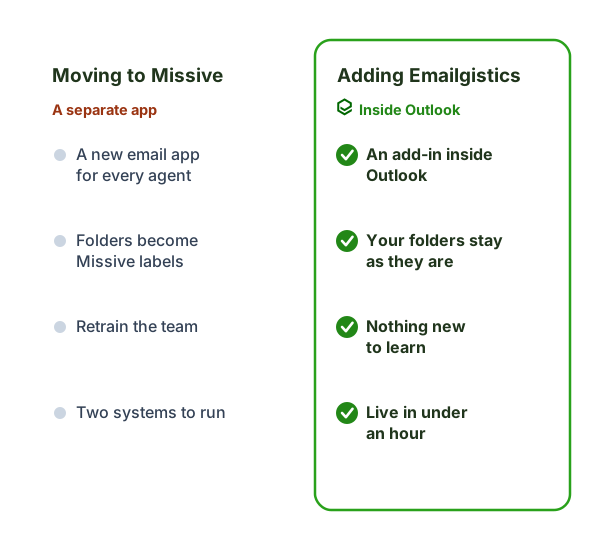
Moving to Missive vs. adding Emailgistics
Missive is its own email app, so your team stops working in Outlook day to day. Emailgistics keeps them in Outlook and adds the structure on top.
- Where your team works: the Missive app vs. Outlook.
- Your folders: turned into Missive labels vs. left as they are.
- Training: a new email app vs. nothing new to learn.
- Rollout: moving the team to a new app vs. live in under an hour.
Why teams choose Emailgistics over Missive
- Keeps shared inbox workflows inside Outlook
- AI-enhanced replies speed up responses
- Applies ownership and SLAs directly to email, not shared conversations
- Performance reporting at the mailbox and individual level
- Lower overhead than all-in-one inbox platforms
- Aligned with Microsoft 365 governance and security
Missive moves teams into a separate shared inbox application designed around chat-style collaboration. Emailgistics enhances Microsoft 365 shared mailboxes directly in Outlook with assignment, SLAs, analytics, reporting, and AI-enhanced replies. Teams that want structure without leaving Outlook often prefer Emailgistics.
Emailgistics is a better fit for Outlook-first organizations that want to improve accountability without adopting a new inbox platform. Missive works well for teams open to replacing their email experience, while Emailgistics supports teams that want to stay within Microsoft 365.
Emailgistics emphasizes clear ownership through assignment and SLA tracking applied directly to shared mailbox email. Missive focuses on shared visibility and team discussion, which can make responsibility less explicit. Teams that need measurable performance often favor Emailgistics.
Emailgistics is designed to scale across many shared mailboxes with centralized reporting inside Microsoft 365. Missive scales as a standalone platform that must be managed separately from Outlook. For departments managing multiple operational inboxes, Emailgistics is often easier to administer long-term.
No. Missive is a standalone email app that connects to your Office 365 account and shared mailboxes with two-way sync, so your team works in Missive rather than Outlook (per Missive’s documentation). Emailgistics runs inside Outlook itself.
Compare Emailgistics vs
Keep collaboration simple and email-first
Bring structure to Outlook shared mailboxes without adding another workspace.