Last updated October 21, 2026
Emailgistics vs Dynamics 365 Customer Service
Shared inbox accountability without full CRM overhead.
Get a Demo


Trusted by global teams across banking, healthcare, logistics, and beyond

















Dynamics manages cases. Emailgistics manages shared mailboxes.
Dynamics 365 Customer Service routes email through CRM cases and records. Emailgistics keeps teams working in Outlook and adds auto-assignment, SLAs, analytics, reporting, and AI-accelerated replies without requiring CRM adoption for everyday email workflows.

Work in Outlook, not a CRM case system
Email-first collaboration vs case management
| Feature |  | Dynamics 365 Customer Service |
|---|---|---|
| Primary focus | Shared mailbox management | CRM case management |
| Where work happens | Inside Outlook | Case-centric UI |
| Automated assignment | Built-in | Rule-based cases |
| SLA tracking | Email-based SLAs | Case SLAs |
| AI-assisted replies | Included | CRM add-ons |
| Analytics | Mailbox- and user-level | Case metrics |
| Reporting | Inbox reporting | CRM reports |
| Adoption speed | Minutes | Lengthy CRM rollout |
When Dynamics 365 makes sense, and when it is overkill
Dynamics 365 Customer Service makes sense when you run a multi-channel contact center (chat, voice, social and email), need case management with entitlements and complex routing, already run Dynamics 365 or Dataverse, and have admins or a partner to configure and maintain it.
It is likely overkill when your team mainly works from shared mailboxes like support@ or orders@, wants to keep working in Outlook, and needs assignment, SLA alerts and reporting rather than a full case management system.
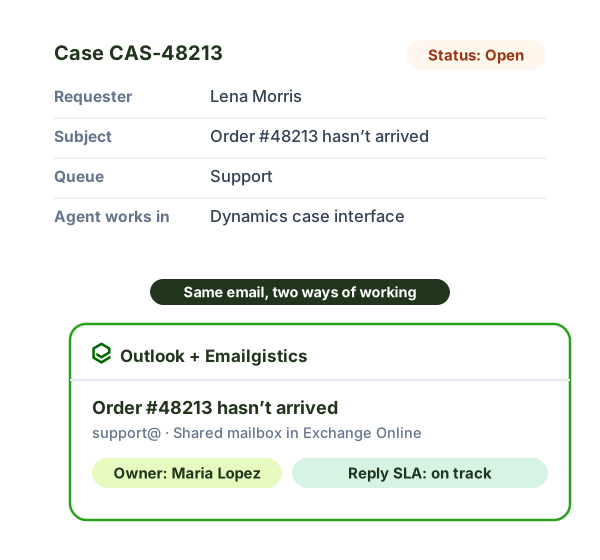
Cost and setup compared
| Dynamics 365 Customer Service | Emailgistics | |
|---|---|---|
| Price (billed annually) | $50 per user per month (Professional) or $105 (Enterprise) | $11 to $46 per user per month |
| Where agents work | The Dynamics case interface | Inside Outlook |
| How email is handled | Converted into cases and records | Stays in the shared mailbox in Exchange Online |
| Setup | A CRM rollout: environments, queues, routing and case forms | Live in under an hour |
Dynamics 365 prices are Microsoft list prices from Microsoft’s pricing page as of October 2026.
Why teams choose Emailgistics over Dynamics 365
- No CRM implementation required for email
- Outlook remains the primary workspace
- Live in under an hour
- AI-enhanced replies included by default
- Lower overhead for shared inbox management
- Full audit trail of ownership and response times
Emailgistics is a better fit when teams manage work through M365 shared mailboxes and want to stay in Outlook. Dynamics is designed for organizations that need structured customer records and case lifecycles, which can add complexity for email-driven teams.
No. Emailgistics is purpose-built for M365 shared inbox workflows and does not require customer records, cases, or entities. Teams that already use a CRM often keep it for customer data while relying on Emailgistics to manage shared mailbox performance more simply.
Emailgistics applies SLAs directly to emails and reports on response times, ownership, and workload within shared mailboxes. Dynamics tracks SLAs and reporting at the case level, which requires creating and managing cases for each interaction.
Operations, internal service, finance, HR, and back-office teams often prefer Emailgistics because it keeps workflows in Outlook. These teams usually need speed, accountability, structure, and reporting without the overhead of full CRM case management.
Often, yes. Dynamics 365 Customer Service is built for multi-channel case management and starts at $50 per user per month billed annually. If your team mainly answers email from shared mailboxes and wants to stay in Outlook, Emailgistics adds assignment, SLA alerts and reporting from $11 per user per month, with no CRM rollout.
Compare Emailgistics vs
Manage shared inboxes without adopting a CRM
Bring accountability and visibility to workflows without changing how teams handle email.