Microsoft 365 Outage See what to expect in Emailgistics  

AI Features Are Here! Discover why teams choose Emailgistics AI  

Comparisons & Alternatives

Shared inbox software pricing compared: what a 15-person team pays in 2026

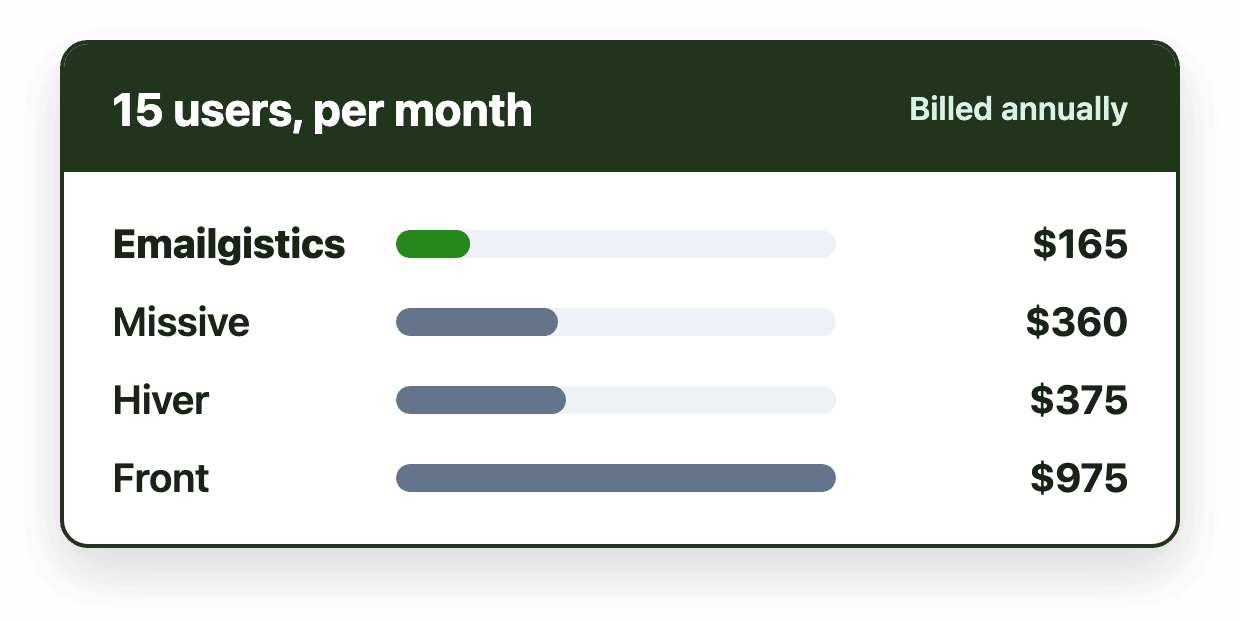
A 15-person team pays $165 to $975 a month for shared inbox software in 2026, billed annually. Emailgistics (Starter plan) is $165, Missive $360, Hiver $375, Help Scout $375 and Front $975, because Front's entry plan stops at 10 seats. Seat caps, AI add-ons and migration matter as much as the headline price.

Emailgistics Research Team 4 minute read Last updated

Monthly cost of shared inbox software for a 15-person team, from Emailgistics at $165 to Front at $975

Key takeaways

  • For a 15-person team billed annually, entry-level shared inbox software costs $165 to $975 a month as of November 2026.
  • Seat caps change the math: Front's $25 plan stops at 10 seats and Missive's $14 plan at 5 users, so a 15-person team starts on the next plan.
  • Check what costs extra: Front's AI Copilot is a $20 per seat add-on below Enterprise.
  • Standalone apps and help desks also cost migration and retraining time that doesn't appear on the pricing page.
  • Emailgistics costs $165 a month for 15 users on Starter or $390 on Professional, works inside Outlook and has no onboarding or migration cost.
On this page

A 15-person team pays between $165 and $975 a month for shared inbox software in 2026, billed annually, depending on the tool and plan. The headline per-user price is only half the story: entry plans often cap the number of seats, AI features can cost extra, and tools that move your team out of Outlook come with migration and retraining time that never shows up on a pricing page.

All prices below come from each vendor's pricing page in November 2026, billed annually unless noted. Prices change often, so check before you buy.

Monthly cost for a 15-person team

ToolEntry plan for 15 usersPer user15 users per monthMid-tier plan for 15 users
EmailgisticsStarter$11$165Professional: $390
MissiveProductive (Starter stops at 5 users)$24$360Business: $540
HiverGrowth$25$375Pro: $825
Help ScoutStandard (listed price)$25$375Plus: $675
FrontProfessional (Starter stops at 10 seats)$65$975Enterprise: $1,575
ZendeskSupport Team (email ticketing only)$19$285Suite Team: $825

Help Scout's pricing page shows one price per plan with a monthly and annual toggle, so its listed prices may change with the billing period you choose.

Seat caps change the math

The cheapest plan on a pricing page isn't always available to your team. Front's $25 Starter plan is limited to 10 seats, so a 15-person team starts at $65 per seat on Professional. Missive's $14 Starter plan is limited to 5 users, so the same team starts at $24 on Productive. Always price the plan your team size actually qualifies for.

What costs extra

  • AI. Front's AI Copilot is a $20 per seat add-on on Starter and Professional, which would add $300 a month for 15 people. Emailgistics includes AI message summaries and suggested replies on Professional and Enterprise.
  • SLAs and reporting. Some tools reserve SLA rules and detailed reporting for mid-tier plans, so compare the plan that has the features you need, not the entry plan.
  • Onboarding. Some vendors charge for implementation or success services. Emailgistics onboarding is free.

The costs that aren't on the pricing page

Tools that replace Outlook carry costs beyond the subscription:

  • Migration. Connecting mailboxes, rebuilding folders as labels or tags, and moving workflows into a new app.
  • Retraining. Every agent learns a new interface, and productivity dips while they do.
  • Two systems. IT manages another app, another set of permissions and another place where email lives.

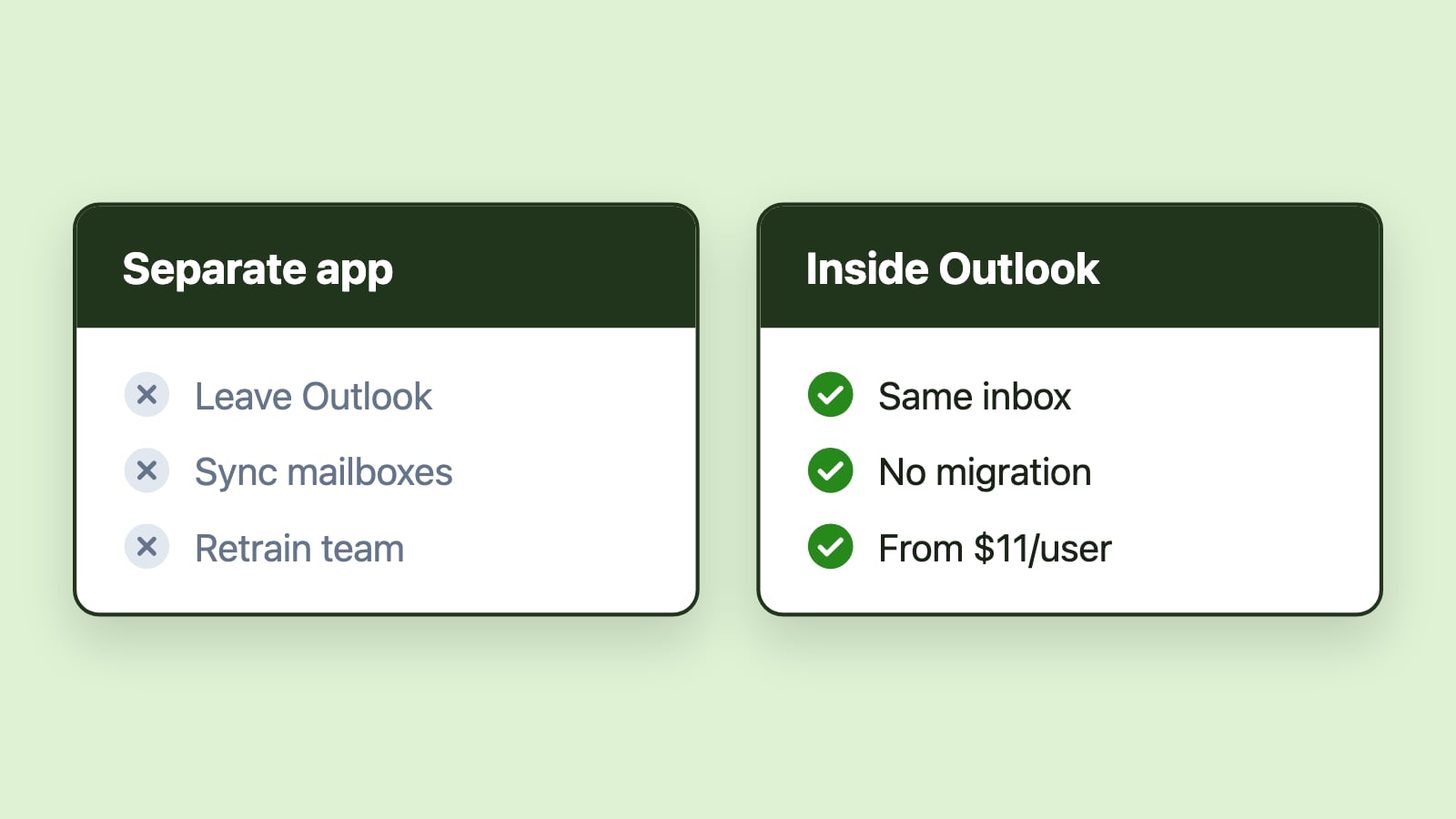
An Outlook-native tool avoids these because the team keeps working in the same shared mailboxes in Outlook. Read more about the hidden cost of unmanaged shared mailboxes.

Price is only worth it if the tool fits

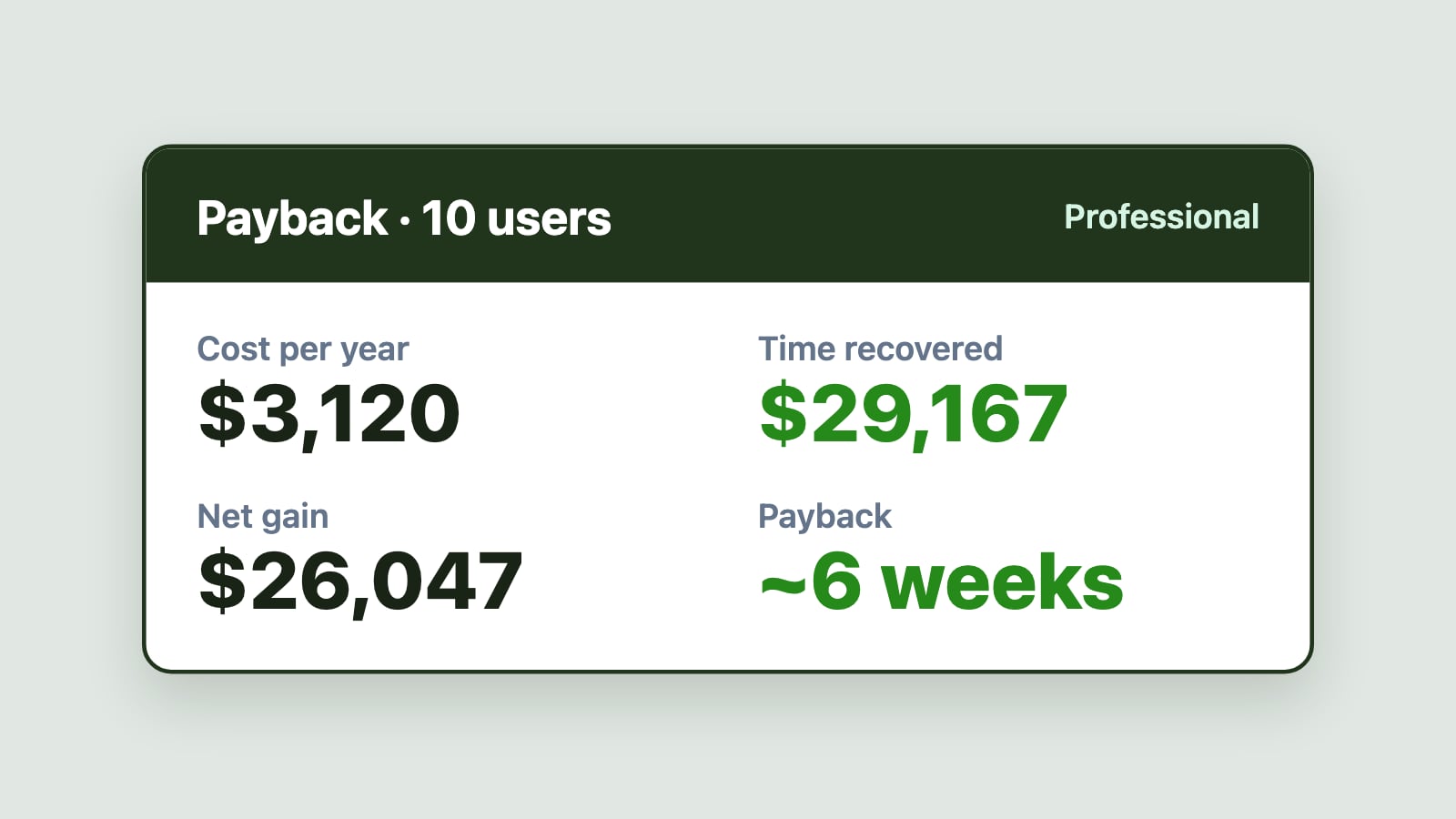
The right comparison is cost against what the team gets back. On the Professional plan, a 10-person team pays $3,120 a year for Emailgistics, and saving just 20 minutes per person per day pays that back in about six weeks. Does shared inbox software pay for itself? works through the math, or try the ROI calculator with your own numbers.

Where Emailgistics lands

Emailgistics costs $11, $26 or $46 per user per month billed annually ($13, $31 or $55 billed monthly), with unlimited shared mailboxes, free guided onboarding and no migration. For 15 users that's $165 a month on Starter or $390 on Professional. See what Emailgistics costs for your team size, or read our guide to the best shared inbox software for Outlook.


Emailgistics features in this post

Written by

Emailgistics Research Team

The team behind Emailgistics benchmarks and research. They write about email statistics, trends and what the numbers mean for shared mailbox teams.

About Emailgistics

Emailgistics is the Outlook-native shared inbox for Microsoft 365. It gives every shared mailbox email one owner, automates routine work, tracks response times against your SLAs and reports on team performance, without leaving Outlook. Most teams are live in under an hour.

Get a Demo

Then try it free for 14 days. No credit card required.

As of November 2026, billed annually, entry-level plans for 15 users cost $165 a month for Emailgistics (Starter plan), $360 for Missive Productive, $375 for Hiver Growth, $375 for Help Scout Standard at its listed price, and $975 for Front Professional, because Front's $25 Starter plan is limited to 10 seats.

Among tools built for shared email, Emailgistics has the lowest per-user entry price at $11 per user per month billed annually, and it works inside Outlook on your existing Microsoft 365 shared mailboxes. Zendesk's email-only Support Team plan is $19 per agent, but it is a ticketing help desk rather than a shared inbox.

Look for seat caps on entry plans, AI and SLA features sold as add-ons or reserved for higher plans, paid onboarding, and the time it takes to migrate mailboxes and retrain the team on a new app. Tools that work inside Outlook avoid the migration and retraining costs.

Most shared inbox tools, including Emailgistics, Front, Missive, Hiver and Help Scout, are priced per user or seat. Emailgistics includes unlimited shared mailboxes, so the price is the same whether the team works from one inbox or five.

Outlook rules and Power Automate are included with most Microsoft 365 plans, but they don't add ownership, SLA tracking or reporting, and someone has to build and maintain the flows. Dynamics 365 Customer Service adds those features but costs $50 per user per month or more.

Share this article

More from the blog

See all posts
  • Comparisons & Alternatives

    Best shared inbox software for Outlook and Microsoft 365 in 2026

    The best shared inbox software for Outlook depends on one question: does your team want to keep working in Outlook? Emailgistics works inside Outlook on the shared mailboxes you already have. Front, Missive and Hiver Omni move the team into their own apps, and help desks turn email into tickets.

    6 minute read November 12, 2026

  • Research & Benchmarks

    Does shared inbox software pay for itself within 6 months?

    Usually much sooner. On a conservative estimate of 20 minutes saved per person per day, a 10-person team using Emailgistics on the Professional plan recovers about $29,167 a year in time against a $3,120 subscription, and pays it back in about six weeks. Here's the math, and how to run it for your own team.

    3 minute read November 12, 2026