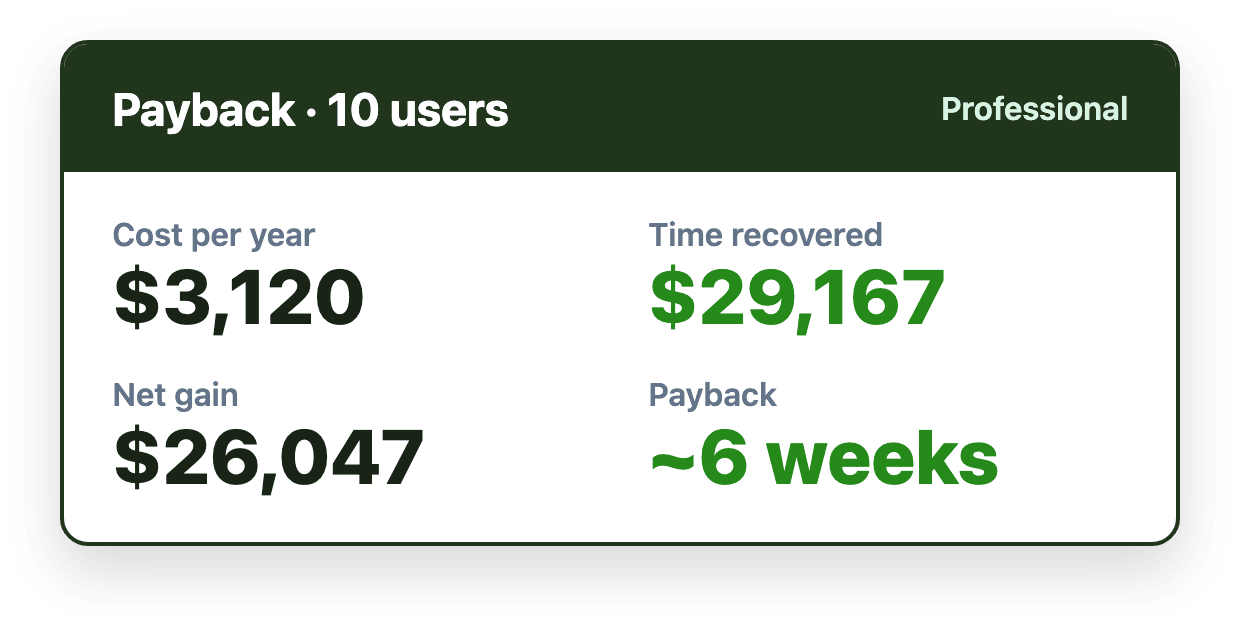
Yes, shared inbox software usually pays for itself well within six months, and often within a few weeks. On a conservative estimate of 20 minutes saved per person per day, a 10-person team using Emailgistics on the Professional plan recovers about $29,167 a year in time against a $3,120 subscription, so it pays for itself in about six weeks. The rest of this post shows the math so you can run it for your own team.
Where the time goes in a shared mailbox
Most of the time a team loses in a shared mailbox isn't spent writing replies. It's spent coordinating:
- Deciding who should handle each new email.
- Checking whether someone else has already replied.
- Messaging colleagues to claim or hand off an email.
- Hunting for emails nobody picked up.
- Fixing duplicate or conflicting replies.
- Building response-time reports by hand.
None of these feel expensive one at a time. Across a team, every day, they add up. See what the research says about email overload.
The ROI formula
You need four numbers:
- Minutes saved per person per day. Start conservatively; 20 minutes is a reasonable floor for a team that currently assigns email by hand.
- Team size. The people working the shared mailboxes.
- Hourly cost. Average salary divided by working hours in a year.
- Annual cost of the tool. Subscription plus any one-time costs.
Value of time recovered per year = minutes saved ÷ 60 × team size × working days × hourly cost. Payback in weeks = annual cost ÷ (value per year ÷ 52).
A worked example: 10 people, Professional plan
Using the same assumptions as the Emailgistics ROI calculator: 10 people, a $70,000 average salary and the Professional plan at $26 per user per month billed annually.
| Conservative estimate | Emailgistics' average | |
|---|---|---|
| Time saved | 20 minutes per person per day | 35% of 2.5 hours lost per day |
| Value of time recovered per year | $29,167 | $76,563 |
| Emailgistics cost per year | $3,120 | $3,120 |
| Net gain per year | $26,047 | $73,443 |
| Payback | About 6 weeks | About 2 weeks |
Even at the conservative figure, by the six-month mark the team has recovered about $14,600 of time against $3,120 in subscription cost.
Costs that slow payback
The subscription isn't always the whole cost. Include:
- Migration. Moving mailboxes and workflows into a new app.
- Retraining. Time every agent spends learning a new interface, and the dip in output while they do.
- Paid onboarding or implementation services.
- Add-ons. AI or SLA features priced separately or only on higher plans.
Tools that replace Outlook carry most of these. An Outlook-native tool like Emailgistics avoids them: there's no migration, onboarding is free and the team keeps working in the same inbox. Compare what different tools cost a 15-person team.
Run the numbers for your team
Enter your own team size and salary in the ROI calculator, or see what Emailgistics costs for your team. Once you're live, Emailgistics' reports show response times, workload and SLA performance, so you can check the return against real data instead of an estimate.