


Overview
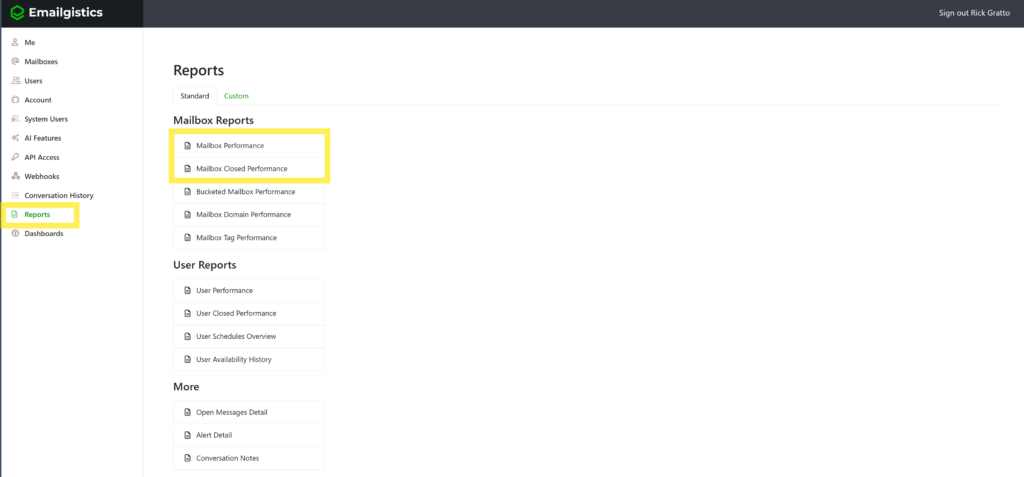
The Mailbox Performance Reports provide detailed insights into how your shared mailboxes are performing in Emailgistics. These reports focus on team-level efficiency, measuring how quickly messages are received, replied to, and closed.
They are separated into two distinct reports:
- Mailbox Performance – focuses on reply activity and responsiveness.
- Mailbox Performance Closed – focuses on how messages are resolved and closed.
Together, these reports give a full picture of team productivity, customer responsiveness, and adherence to SLAs.
Why It Matters
Mailbox performance data helps managers understand how their teams handle customer communication across shared mailboxes.
These insights enable you to:
- Monitor team responsiveness and efficiency.
- Identify workload bottlenecks or recurring slowdowns.
- Track SLA compliance for both replies and resolutions.
- Compare current performance to previous periods for trend analysis.
- Drive accountability and improvement within teams.
Mailbox Performance Report
Purpose
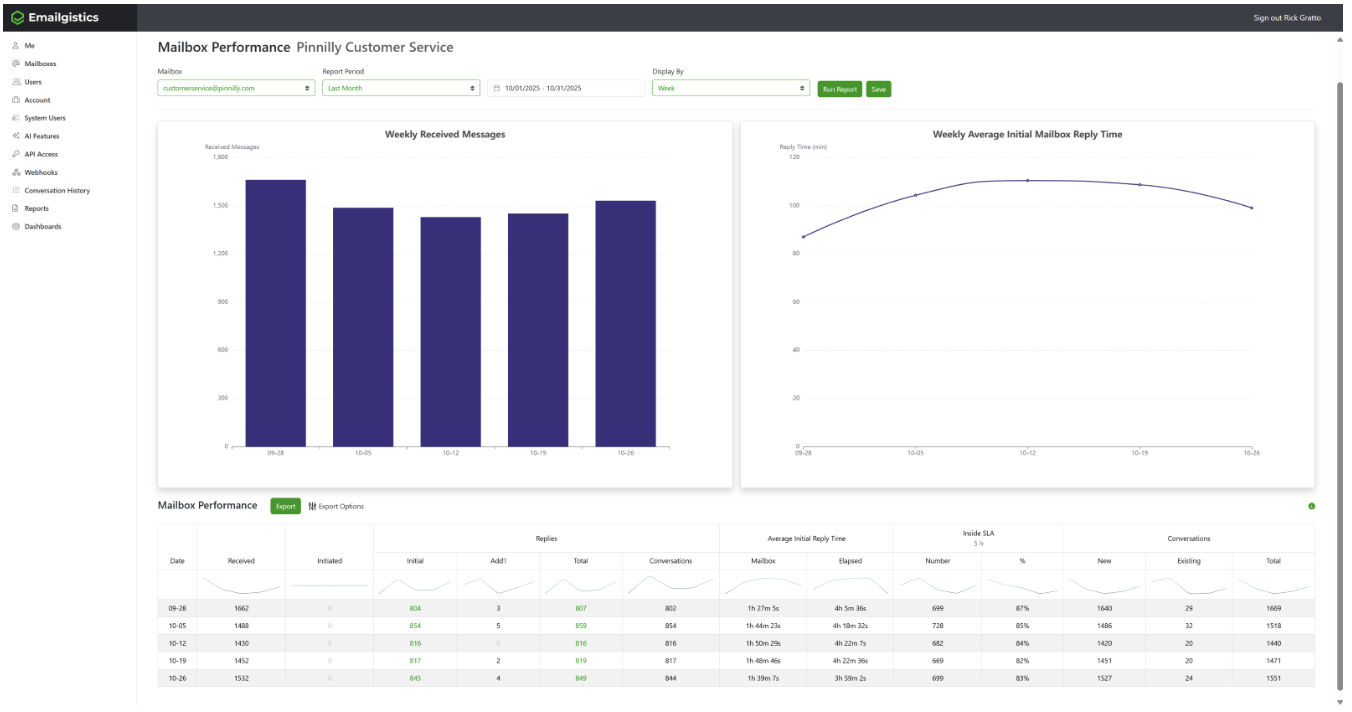
Tracks all reply-related activity within a shared mailbox, providing visibility into how fast and how often your team responds to customer messages.
Key Metrics
Received
The number of messages received in the mailbox during the selected time period.
Initiated
The number of messages sent from the mailbox that were not replies (for example, messages composed as new outbound emails).
Replies
- Initial: The first reply sent to an incoming message. Note: the message being replied to might have been received in an earlier period; this count reflects when the reply was sent.
- Additional: All subsequent replies sent after the initial reply.
- Total: The sum of Initial and Additional replies.
Conversations
The number of conversations involved in replies. A higher number indicates fewer replies per conversation, suggesting efficiency.
Average Initial Reply Time
- Mailbox: Time measured during open mailbox hours.
- Elapsed: Total time measured continuously.
Example: a message received Sunday at 9 AM and replied to Monday at 8 AM counts as 1 hour of mailbox time, or 23 hours elapsed, assuming a mailbox schedule of 7:00 AM to 9:00 PM, Monday through Friday.
Inside SLA
Displayed only when a reply SLA is active for the period.
- Number: Number of initial replies made within the SLA.
- Percentage: Portion of total initial replies that met the SLA target.
Conversations (New / Existing)
- New: Conversations started in this reporting period.
- Existing: Conversations started earlier but with activity in this period.
- Total: The sum of New and Existing.
How to Access
- Log in to the Emailgistics Portal.
- Navigate to Reports → Mailbox Performance.
- Select mailbox and date range.
- Review or export the report.
Practical Use Cases
- Identify communication trends.
- Improve team responsiveness.
- Track SLA success.
- Support data-driven coaching.
Mailbox Performance Closed Report
Purpose
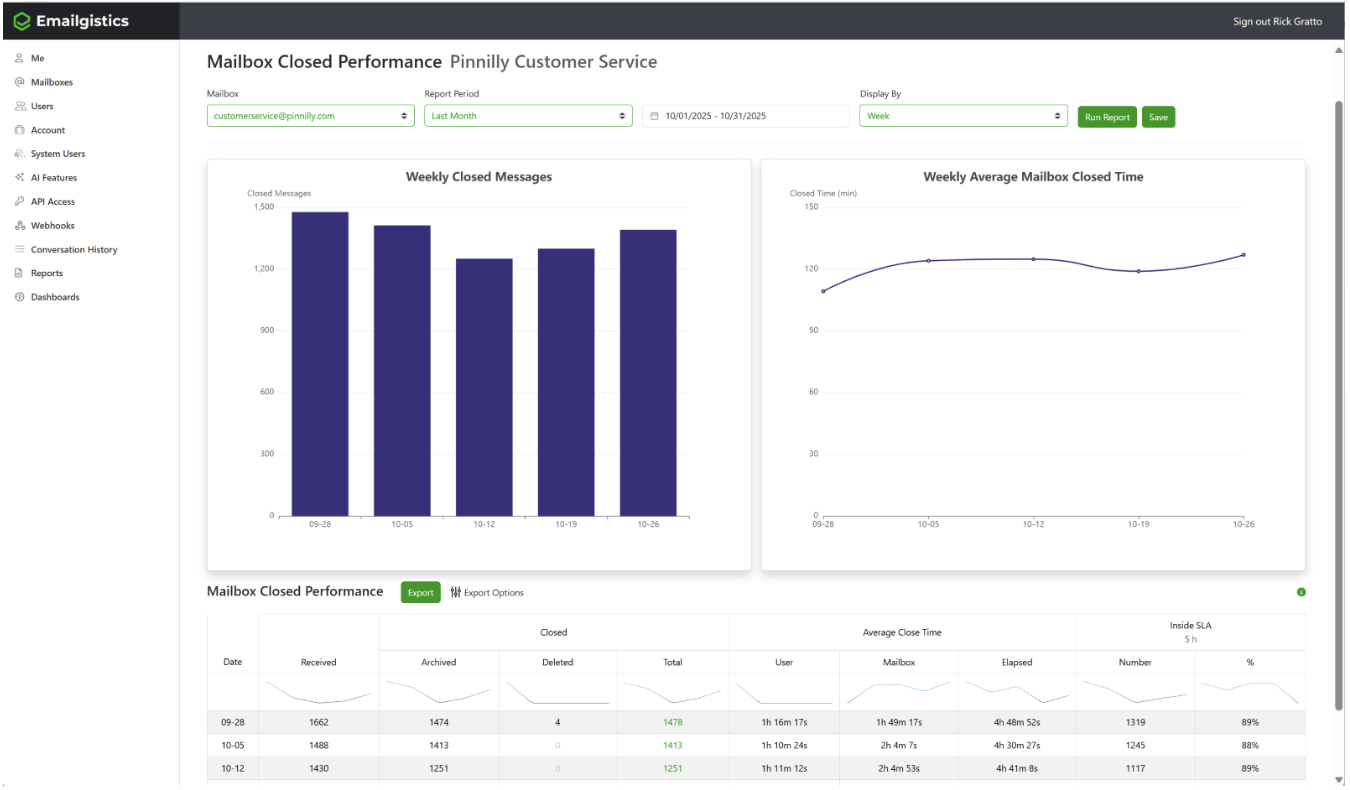
Measures how efficiently messages are resolved and closed, providing insights into completion times and closure methods.
Key Metrics
Received
The total number of messages received in the mailbox during the reporting period.
Closed
- Archived: Messages closed by archiving.
- Deleted: Messages closed by deleting.
- Total: Archived plus Deleted, excluding other folder moves.
Average Close Time
- User: Measures time to close based on user availability.
- Mailbox: Measures close time based on mailbox schedule.
- Elapsed: Total continuous time from receipt to closure.
Inside SLA
Displayed only when a close SLA is active.
- Number: Messages closed within the SLA.
- Percentage: Portion of total closed messages that met the SLA target.
How to Access
- Log in to the Emailgistics Portal.
- Navigate to Reports → Mailbox Performance Closed.
- Select mailbox and date range.
- Review or export the report.
Practical Use Cases
- Monitor team efficiency.
- Understand closure behavior (archive vs. delete).
- Evaluate workload management.
- Support coaching and goal setting.
If you have any questions or would like some more information on the Emailgistics performance reports, please contact [email protected].